Are you a trader looking to sharpen your edge by tracking every move and analyzing your trades? Choosing the right trading journal software can be a game-changer. But with options like TradeZella and Tradervue on the market, which one should you trust to help boost your trading performance?
In this article, we’ll take a friendly, straightforward dive into TradeZella and Tradervue, two popular trading journaling platforms. We’ll explore their main features, pricing, usability, and how each stacks up against the other. Whether you’re an experienced trader or just starting, this guide will help you decide which trading journal fits your style and goals best.
What Is a Trading Journal and Why Does It Matter?
Before diving into these platforms, let’s quickly cover why a trading journal is crucial for traders.
A trading journal is a tool where traders record every trade they make—details like entry and exit points, position size, setups, and emotions felt. Over time, this helps identify patterns, strengths, and weaknesses to improve decision-making and discipline. Good trading journals also offer data analysis, charts, and reports to backtest and optimize strategies.
Now, let’s see how TradeZella and Tradervue help traders log and analyze their progress.
TradeZella Overview: The Modern, Data-Driven Journal
TradeZella aims to be a cutting-edge trading journal, packed with analytics and sleek visual interfaces designed to give traders deeper insights at a glance.

Key Features of TradeZella
- Automated Trade Import: TradeZella seamlessly imports trade data from many brokers and platforms, saving you time on manual entries.
- Advanced Metrics and Analytics: The dashboard highlights key stats like win rate, average profits/losses, risk-reward ratios, and expectancy.
- Trade Tags and Notes: Easily tag trades by setup, strategy, or emotion to sort and filter your journal entries.
- Daily Trading Performance Summary: Get daily snapshots of your performance to keep on top of your progress.
- Robust Reporting Tools: Download detailed performance reports and charts for a closer look.
- User-Friendly Interface: Clean dashboards make navigation and data entry straightforward, even for beginners.
Strengths
TradeZella shines with its data visualization and real-time stats, allowing traders to spot trends quickly. The automation smooths the journaling process, reducing tedious manual work. Its interface is modern and intuitive which is great for traders who appreciate clean, interactive dashboards.
Weaknesses
One possible downside is that TradeZella’s in-depth features may feel overwhelming initially to new traders. Also, its range of supported broker integrations, while growing, is less extensive compared to some competitors.
Tradervue Overview: The Established, Flexible Journal
Tradervue has been a mainstay in the trading journal space for years, appreciated for its simplicity and flexibility across all trading styles.
Key Features of Tradervue
- Multi-Asset Support: Tradervue supports stocks, options, futures, and forex, a big plus for diversified traders.
- Manual and Automatic Trade Entry: You can input trades manually or connect Tradervue to your broker for automatic uploads.
- Trade Tagging and Notes: Like TradeZella, it allows detailed tagging, notes, and screenshots per trade.
- Performance and Equity Curve Tracking: See how your trading equity evolves over time with clear visual curves.
- Community and Sharing: Tradervue enables sharing reports with mentors or peers for collaborative feedback.
- Robust Export and Filter Options: Download data for advanced offline analysis or filter trades by date, strategy, outcome, and more.
Strengths
Tradervue excels with its multi-asset versatility and long track record trusted by thousands of traders worldwide. Its clean reports and equity curve visualizations deliver actionable insights, and its simplicity appeals especially to those who want fewer bells and whistles.
Weaknesses
The interface feels a bit dated compared to newer platforms like TradeZella. For highly data-driven traders seeking advanced analytics, Tradervue may seem somewhat basic. Some users also mention the initial setup of broker integrations can be complex.
Pricing Breakdown: How Much Does Each Cost?
Cost is a big consideration! Here’s how TradeZella and Tradervue price their services.
TradeZella Pricing

TradeZella’s pricing plans are discussed below:
Basic Plan: The Basic plan costs $29 a month and gives you acess to some pro and all basic features including detailed analytics. Its annual version costs you $24/mo a month. Here’s a list of the features you get:
- Can add up to 1 accounts
- 1GB of secure data storage
- Create up to 3 Playbooks
- 5 Mentor Invites
- Unlimited Backtesting
Premium Plan: For the Premium plan, you will be charged $49/month or $33/mo if you choose to pay it annually. It adds full broker integrations, detailed analytics, and unlimited trades. The following list summarizes its features:
- Connect up to 20 accounts
- 5GB of secure data storage
- Unlimited Playbooks
- Unlimited Mentor Invites
- Unlimited Backtesting
- Sessions Trade Replay
TradeZella’s pricing is competitive, especially if you value automatic data import and rich analytics.
Tradervue Pricing
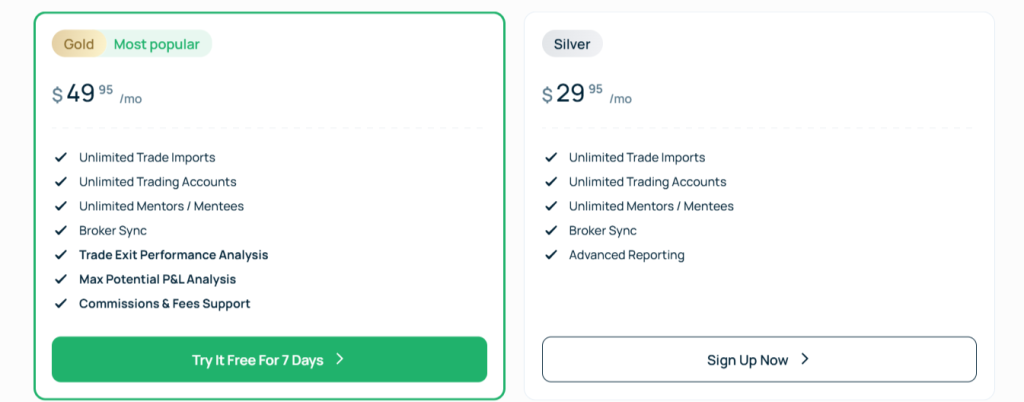
Now let’s have a look at the pricing plans offered by Tradervue.
Silver Plan: The Gold plan costs $29.95/month for access to basic features of the platform. These features include:
- Unlimited Trade Imports
- Unlimited Trading Accounts
- Unlimited Mentors / Mentees
- Broker Sync
- Advanced Reporting
Gold Plan: You have to pay $49.95 every month month for the Gold plan offered by Tradervue. The following features come with this plan:
- Unlimited Trade Imports
- Unlimited Trading Accounts
- Unlimited Mentors / Mentees
- Broker Sync
- Trade Exit Performance Analysis
- Max Potential P&L Analysis
- Commissions & Fees Support
Tradervue’s pricing is reasonable, with solid value for those who want a proven journaling tool without extra frills.
TradeZella vs Tradervue: Head-to-Head Comparison
| Feature | TradeZella | Tradervue |
| Ease of Use | Modern, intuitive UI | Simple, classic UI |
| Trade Import | Automated broker integrations | Auto-import & manual |
| Asset Coverage | Mostly stocks & options | Stocks, options, futures, forex |
| Analytics & Reporting | Advanced metrics & customizable | Solid performance reports |
| Community Features | Limited | Sharing & collaboration |
| Pricing Starts At | Pro, Starting at $29/month | Free, Pro $29.95/month |
Which Should You Choose?
- Go with TradeZella if you want a sleek, modern platform with automated data import and detailed analytics to help optimize your trades.
- Choose Tradervue if you value proven multi-asset support, simple usability, and somewhere to collaborate with peers.
Final Thoughts: Which Trading Journal Wins?
Both TradeZella and Tradervue offer valuable tools for traders serious about journaling and improving their edge. TradeZella impresses with its clean design and rich analytics, making it ideal for tech-savvy traders who like data visualization and automation. Tradervue remains a reliable, flexible option for traders seeking a straightforward journal that covers multiple asset classes and priorities simplicity.
If you are just starting out or prefer a no-fuss solution, starting with Tradervue’s free or Pro plan is a solid choice. But if you crave cutting-edge insights and time-saving automation, TradeZella’s Pro plan may give you that extra boost.
In the end, the best trading journal is the one that fits your style and encourages you to consistently track, learn, and improve. Try both free versions, explore their features, and pick the winner that helps you become a smarter trader.